What should I do if my product is flashing red?
If your problem manifests itself in the same way as in the gif:
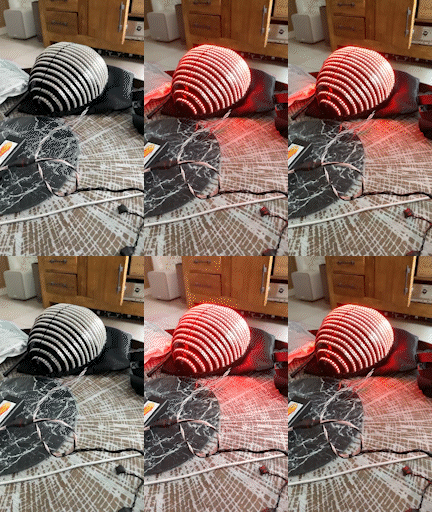
First, you need to charge the batteries. This can be done using a charger suitable for the battery type used in the product.
Our products use rechargeable batteries of the 18650 type or smaller rechargeable batteries of the 14500 type (they are also called AA rechargeable batteries).
Our products use rechargeable batteries of the 18650 type or smaller rechargeable batteries of the 14500 type (they are also called AA rechargeable batteries).
How to choose the right batteries can be found in our article on batteries:
What batteries are needed?
If you have an Imax B6 or similar charger, here is a link to help you charge your batteries:
How to charge 18650 type batteries with Imax B6 charger or similar?
If this does not help, then you need to check the memory card located in the controller:
It is also necessary to check the memory card for errors. Use a microSD to USB adapter or a respective slot in a laptop to connect the memory card to your computer. If the computer recognizes the memory card but cannot open it, you need to erase all data on the memory card. To do this, you need to format it. Video instructions on formatting memory cards can be viewed here: Formatting settings: FAT32 file system. Copy all files for the controller from our Amazon cloud drive. The link to the cloud drive is usually provided together with instructions for creating new effects in Madrix. Contact ETEREshop managers if you do not have a link to the cloud drive. You can also use your own backup copy on your computer if you have one.
What batteries are needed?
If you have an Imax B6 or similar charger, here is a link to help you charge your batteries:
How to charge 18650 type batteries with Imax B6 charger or similar?
If this does not help, then you need to check the memory card located in the controller:
It is also necessary to check the memory card for errors. Use a microSD to USB adapter or a respective slot in a laptop to connect the memory card to your computer. If the computer recognizes the memory card but cannot open it, you need to erase all data on the memory card. To do this, you need to format it. Video instructions on formatting memory cards can be viewed here: Formatting settings: FAT32 file system. Copy all files for the controller from our Amazon cloud drive. The link to the cloud drive is usually provided together with instructions for creating new effects in Madrix. Contact ETEREshop managers if you do not have a link to the cloud drive. You can also use your own backup copy on your computer if you have one.
Please don't forget to unzip the downloaded archive. At the root of the memory card, there should be text files located at your link.
If the computer does not recognize the memory card, you need to replace memory card. You can try taking a memory card from a spare controller if available. If the problem is not resolved, chances are high that the controller's microSD slot has been damaged. In this case, repair or use of a spare controller is required.
Related Articles
Some parts of the product aren't glowing
Attention, be sure to check that you are using the correct batteries and they are fully charged! You can find out which batteries are suitable for our devices and how to charge them with the Imax B6 charger using the links below: What batteries are ...Programming Custom LED Effects with Madrix: A User-Friendly Guide
Before You Begin Welcome to the exciting world of LED effect customization! This comprehensive guide is designed to walk you through every step of the process, ensuring that even if you’re new to computers, you’ll be able to follow along and ...LED Effects Programming using ETERESHOP Screen Grabber
For those of you who bought our LED pixel products and don’t have much time for creation of your own effects, ETEREshop team released a specialized software to grab effects you like from any source. Grabbed image can be uploaded straight to the SD ...Recommendations for the care and storage of mirror products
Washing Mirror products cannot be washed in the washing machine. Mirror products can be soaked exclusively in cold water with soap or in a solution with soda. After rinsing, dry thoroughly! If the product has a removable lining, it can be washed ...How to assemble Smart Ballet Tutu with164 LEDs
This manual will tell you how to assemble and work with Smart Ballet Tutu with164 LEDs To work with the Ballet tutu, you need to purchase 14500 batteries Unlike 18650 batteries, 14500 batteries do not have to be flat. Required characteristics: ...